The Best Smart Home Security Systems for 2026
Smart home security is finally at the point where you can get real protection without turning your house into a science project. But the choices in 2026 are overwhelming: subscriptions, self-monitoring, “AI” detection that sometimes isn’t, and ecosystems that don’t play nice. Trevor and I were discussing the best smart home security systems for 2026 after helping a friend set up a new place—and we realized most people don’t need “everything,” they need the right setup for their home and routine.
Disclaimer: As an Amazon Associate, TrevMart earns from qualifying purchases at no extra cost to you.

Quick Picks: Our Top Security Systems for 2026
If you just want the shortlist, here are the systems we’d recommend most often. Below, we break down who each one is best for and what you give up (if anything) to get it.
Best Overall: Ring Alarm + Ring Cameras
Ring is still the easiest “it just works” option for most households. Setup is fast, accessories are plentiful, and it’s simple to expand as you add doors, windows, or outdoor coverage.
- Best for: Most homes and apartments that want a smooth setup and lots of hardware choices
- Why it wins: Big device ecosystem and solid app experience
- Watch for: Some best features depend on a subscription
Best No-Subscription Approach: Eufy Security (Self-Monitored)
If you hate monthly fees, Eufy’s local storage approach is appealing. You can record events at home and keep ownership of your footage, which also helps cut cloud costs.
- Best for: Buyers who want to avoid paying every month
- Why it wins: Strong local storage options and good camera lineup
- Watch for: You’re responsible for your own monitoring habits
Best for Apple Households: abode + HomeKit (Where Supported)
If your household runs on iPhone, Apple Watch, and HomePod, you’ll get the cleanest day-to-day experience by choosing a system that plays well with Apple automation. abode remains a strong option for flexible smart home integrations.
- Best for: Apple-centric homes that care about automation and privacy-minded workflows
- Why it wins: Smart home compatibility and flexible monitoring options
- Watch for: Always verify current HomeKit/Matter support for the exact devices you’re buying
Best for Renters: SimpliSafe
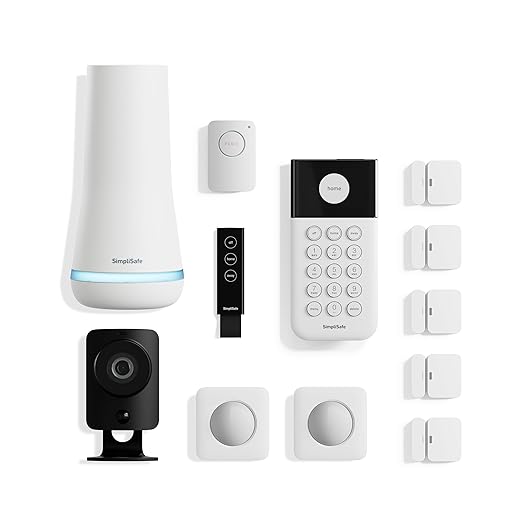
SimpliSafe is renter-friendly: minimal drilling, straightforward sensors, and a system you can take with you when you move. It’s also a solid pick for people who want professional monitoring without a complicated install.
- Best for: Apartments, rentals, and quick moves
- Why it wins: Easy setup and strong monitoring reputation
- Watch for: Some advanced camera features may require a plan
Best for Google Smart Homes: Google Nest (Cameras + Aware)
Nest is still a top option if you already use Google Home and want a clean, unified timeline for events. The cameras are strong for everyday use, especially when you want smart alerts that help cut down on noise.
- Best for: Google Home households that want a unified app experience
- Why it wins: Polished app timeline and useful event detection
- Watch for: Subscription pricing and feature gating
What “Best” Means in 2026 (It’s Not Just the Camera)
The best smart home security systems for 2026 aren’t only about sharp video. They’re about catching the right events, reducing false alerts, and making it easy to respond when you’re busy.
Must-Have System Features
- Reliable motion/person detection so you’re not alerted every time a car passes
- Fast notifications so you can act while it matters
- Flexible monitoring (self-monitoring or professional) to match your lifestyle
- Good battery life and stable Wi‑Fi so devices don’t “go dark” at the worst time
- Local storage options if you want less cloud dependence and fewer monthly fees
Subscriptions vs. No Subscription: The Real Trade-Off
Subscriptions can be worth it if they improve detection, add longer video history, or provide professional monitoring. But if you’re mostly using cameras for package alerts and checking in on your property, local storage can cover the basics without the ongoing bill.
Deep Dives: How to Choose the Right System
1) Start with Entry Points (Doors and Ground-Floor Windows)
Most break-ins aren’t movie-style. They often start with an easy door, a sliding door, or a window that doesn’t get used much. Prioritize sensors for the places someone could enter quickly.
- Door sensors on front, back, and garage entry doors
- Window sensors on accessible ground-floor windows
- A keypad in a central spot so arming/disarming becomes a habit
2) Add Cameras Where They Actually Help
More cameras isn’t always better. A few well-placed cameras often beat a scattered setup that misses faces and entry angles.
- Doorbell camera: Helps with packages and front-door events
- Driveway/front yard camera: Captures approach, not just the doorstep
- Backyard/side gate camera: Covers low-visibility paths
3) Decide How You Want to Monitor
Self-monitoring works if you’re responsive to alerts and your household can maintain routines. Professional monitoring makes sense if you travel, sleep through notifications, or want a backup when you’re busy.
Pros & Cons: Popular Systems at a Glance
Ring Alarm
- Pros: Huge accessory lineup; easy to expand; strong doorbell ecosystem
- Cons: Best video features usually require a plan
SimpliSafe
- Pros: Great for renters; simple setup; solid professional monitoring options
- Cons: Smart home integrations can be more limited than DIY ecosystems
Eufy Security
- Pros: Strong local storage options; good value; fewer monthly costs
- Cons: You need to be consistent about checking events and maintaining devices
Google Nest
- Pros: Smooth Google Home experience; strong event timeline with subscription
- Cons: Subscription dependency for key features; hardware is often pricier
TrevMart Tip: Fix Your Wi‑Fi Before You Buy More Gear
Martin’s Take: If your doorbell camera lags or your backyard camera drops out, buying a “better camera” won’t fix it. Start by checking signal strength at each camera location. If it’s weak, add a mesh node or a wired access point closer to the problem area. A stable connection is what makes alerts fast and recordings reliable.
Recommended Setups (Steal These)
Apartment / Rental Starter Kit
- 1 keypad + base station
- 2–4 entry sensors (front door, patio door, key windows)
- 1 indoor camera facing the main entry path
- Optional: doorbell camera if your building allows it
Suburban Home “Coverage Without Overkill”
- Keypad + entry sensors for all exterior doors
- Glass break sensor or acoustic sensor for main living area
- Doorbell camera + driveway camera
- Backyard camera covering gates and sliding doors
Privacy-First, Low Monthly Cost Setup
- Local storage hub or base station
- Cameras with on-device detection features
- Minimal cloud reliance for fewer recurring fees
- Strong passcodes + 2FA on all accounts
Buying Checklist for 2026
Before you hit “Buy,” run through this list. It prevents the most common regret purchases.
- Storage plan: Cloud, local, or both?
- Power plan: Battery, wired, or PoE where possible?
- Notifications: Can you set zones, schedules, and people-only alerts?
- Recovery: What happens if Wi‑Fi goes out or power fails?
- Compatibility: Works with your phone ecosystem and smart home platform?
Final Verdict: The Best Smart Home Security Systems for 2026
If you want the most straightforward all-around system, Ring Alarm remains the easiest pick for most households. If avoiding monthly fees is your top priority, Eufy is a strong self-monitored route with local storage. Renters should look hard at SimpliSafe for the hassle-free install, while Google Home households will appreciate Nest’s cohesive experience.
What’s your setup for 2026—are you going all-in on professional monitoring, or building a no-subscription system you control?