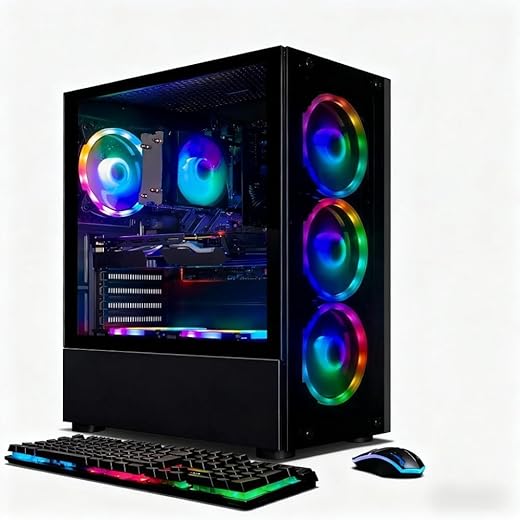


Budget Gaming PCs: The Best Picks for Entry-Level Gamers
Getting into PC gaming is exciting—right up until you see price tags that look like rent payments. The good news: today’s budget gaming PCs can deliver smooth 1080p performance without turning your wallet inside out.
From the TrevMart perspective, Trevor and I were literally debating what matters most for a first-time rig: raw FPS, upgrade potential, or “just works” reliability. The answer depends on what you play, but the picks below cover the most common entry-level needs.
Disclaimer: As an Amazon Associate, TrevMart earns from qualifying purchases at no extra cost to you.

What “Budget” Means for Entry-Level Gaming in 2026
For most new PC gamers, “budget” lands between $600 and $1,000 for the tower. That range is enough for popular esports titles at high settings and many AAA games at medium settings (often with upscaling on).
If you already have a monitor, keyboard, and mouse, put more money into the GPU. If you don’t, consider a slightly cheaper tower so you can still afford a decent 1080p/144Hz display.
Quick expectations (realistic, not marketing fluff)
- 1080p gaming is the sweet spot for entry-level rigs.
- High FPS esports (Fortnite, Valorant, Rocket League) is easy to achieve with the right CPU/GPU combo.
- AAA games should be playable at medium settings; turning on FSR/DLSS (if supported) helps a lot.
- Upgrade paths matter—a good case, PSU, and motherboard can extend your PC’s life by years.
How We Picked the Best Budget Gaming PCs
Prebuilts vary wildly. Some use great CPUs but cut corners on the power supply or cooling, which can cause headaches later.
These recommendations prioritize balanced performance and parts you won’t hate upgrading.
Our non-negotiables
- 16GB of RAM so you can game + chat + browse without stutters.
- At least a 1TB NVMe SSD so games load fast and you aren’t juggling installs.
- A modern 6-core (or better) CPU for stable frame pacing in newer titles.
- A known-name PSU (or at least reputable wattage headroom) for long-term stability.
- Airflow that makes sense—front intake fans and room for the GPU to breathe.
The Best Picks: Budget Gaming PCs for Entry-Level Gamers
Below are four “buying lanes” that match how most people shop: cheapest playable, best overall value, esports-focused, and upgrade-friendly.
Exact parts can change week to week (especially GPUs), so focus on the target specs and price ranges.
1) The “Just Get Me Gaming” Pick (Best Under ~$700)
If you want to play Fortnite, Minecraft, Valorant, Overwatch 2, and similar titles at 1080p without drama, this tier is your on-ramp.
- Target CPU: AMD Ryzen 5 5500/5600 or Intel Core i5-12400F
- Target GPU: Radeon RX 6500 XT / RX 6600 (preferred) or GeForce RTX 3050 (only at the right price)
- Memory: 16GB DDR4 so Windows stays snappy while you game
- Storage: 1TB NVMe SSD for quick installs and fast loading
- PSU: 550W+ with room for a future GPU upgrade
Pros & Cons
- Pro: Lowest cost to get smooth 1080p in esports titles.
- Pro: Typically easy to upgrade later (RAM, SSD, GPU).
- Con: AAA games may need medium/low settings.
- Con: Some prebuilts in this tier cheap out on cooling and PSUs—check listings carefully.
2) Best Overall Value (The Sweet Spot Around ~$800–$950)
This is where budget gaming PCs start to feel “real.” You get better 1% lows (less stutter), stronger 1080p performance, and more headroom for new releases.
- Target CPU: Ryzen 5 5600/7600 or Intel Core i5-13400F
- Target GPU: Radeon RX 7600 / RX 6650 XT or GeForce RTX 4060
- Memory: 16GB (or 32GB if the deal is close) so heavy games don’t choke
- Storage: 1TB NVMe (2TB is a bonus if you install big AAA libraries)
- PSU: 600W–650W from a reputable brand for stable boosts under load
Pros & Cons
- Pro: Great 1080p settings, often with high FPS.
- Pro: Stronger GPUs mean better longevity.
- Con: Some models ship with a single-channel RAM stick—easy fix, but annoying.
- Con: You’ll still pay more for premium cases and quiet fans.
3) The Esports FPS Machine (Best for 1080p/144Hz+)
If you mainly play competitive shooters and want high refresh rates, CPU performance and stable frame pacing matter as much as the GPU.
- Target CPU: Ryzen 5 7600/7500F or Intel Core i5-13600KF (if discounted)
- Target GPU: RTX 4060 or RX 7600 (more GPU helps, but don’t neglect the CPU)
- Memory: 16GB–32GB so background apps don’t steal frames
- Storage: 1TB NVMe for fast patching and quick restarts
Pros & Cons
- Pro: High FPS in Valorant/CS2/Fortnite with the right settings.
- Pro: Better “feel” thanks to improved 1% lows.
- Con: It’s easy to overspend chasing frames you can’t see on a 60Hz monitor.
- Con: Some prebuilts push flashy RGB instead of real cooling upgrades.
4) The Upgrade-Friendly Starter (Best Long-Term Buy)
If you plan to swap in a stronger GPU later, prioritize the platform: motherboard, PSU, and case airflow. You’ll thank yourself when you upgrade.
- Target CPU & platform: AM5 (Ryzen 7000 series) or Intel LGA1700 with a solid chipset
- Target GPU: Anything from RX 6600 to RTX 4060 depending on price
- Memory: 16GB now, with easy path to 32GB later
- PSU: 650W–750W so a future midrange GPU upgrade is plug-and-play
- Case: Mesh front panel + at least two intake fans for cooler, quieter gaming
Pros & Cons
- Pro: The easiest path to a “new PC” feeling later with a single GPU upgrade.
- Pro: Better thermals and stability if the case/PSU are legit.
- Con: Upfront cost can be slightly higher.
- Con: Not all brands clearly list PSU and motherboard details—don’t guess.
Buying Checklist: Don’t Get Burned by Bad Prebuilts
Two PCs can look identical on paper and perform differently because of cooling, RAM configuration, or a low-quality power supply.
Use this checklist before you buy.
Five things to confirm on the product page
- RAM setup: Look for 2x8GB (dual-channel). It can boost performance versus 1x16GB.
- SSD type: NVMe beats SATA for load times and big file transfers.
- PSU wattage and brand: “600W” means little if it’s a no-name unit.
- Cooling: At least a basic tower cooler or decent case airflow keeps noise down.
- GPU model (exact): Don’t accept vague listings like “RTX graphics.” Get the number.
Martin’s Take: Spend $30 Now, Save a Headache Later
If the prebuilt you want comes with a single 16GB stick of RAM, budget for a matching second stick. Dual-channel memory often improves frame consistency, and it’s one of the easiest upgrades you can do in 10 minutes.
Recommended Settings for Entry-Level PCs (Fast Wins)
You don’t need ultra settings to have a great time. A few tweaks can give you a big FPS bump with minimal visual change.
Settings that usually help the most
- Turn down shadows to improve FPS in open-world games.
- Use upscaling (FSR/DLSS) when available for smoother performance at 1080p.
- Cap your FPS to your monitor’s refresh rate to reduce heat and fan noise.
- Use fullscreen exclusive when possible for better latency.
Final Verdict: Which Budget Gaming PC Should You Buy?
If you’re trying to spend the least, target a Ryzen 5 or Core i5 with an RX 6600-class GPU and 16GB RAM. It’s the most reliable “entry” formula we’ve seen for smooth 1080p gaming.
If you can stretch to the $800–$950 range, do it. That tier tends to feel faster everywhere—higher FPS, fewer dips, and more breathing room for new releases.
Our advice: choose the best-value model you can afford, then plan one smart upgrade later (usually RAM to 32GB or a bigger SSD). You’ll avoid buying twice.
What games are you planning to play—and what’s your target budget for the tower? Drop it in the comments and we’ll help you narrow the best pick.