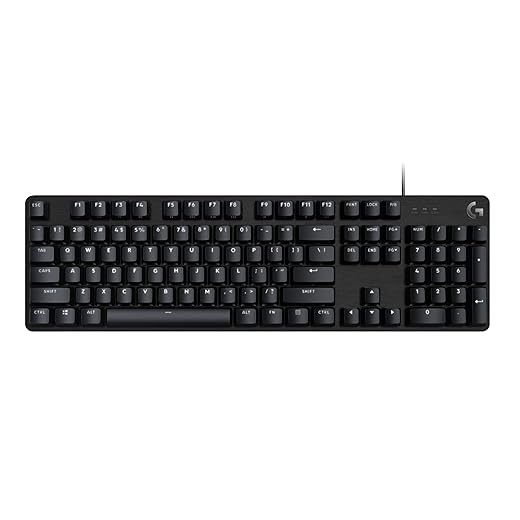

The Best Mechanical Keyboards for Coding and Gaming
You sit down to code “for an hour,” and suddenly it’s midnight. Your hands are tired, typos are piling up, and that bargain keyboard feels like it’s fighting you. That’s where the best mechanical keyboards for coding and gaming earn their keep—faster inputs, better comfort, and a typing feel that makes long sessions easier.
From the TrevMart side of things, Trevor and I were discussing a simple question: what actually helps you write cleaner code and play better, without getting lost in hype? This guide cuts to the keyboards that deliver.
Disclaimer: As an Amazon Associate, TrevMart earns from qualifying purchases at no extra cost to you.
What to Look for in a Mechanical Keyboard (Coding + Gaming)
One keyboard can do both jobs, but only if you pick the right switch type, layout, and features. The goal is fewer mistakes, less fatigue, and a setup that fits how you work.
Switches: Your Fingers Notice Everything
Switch choice affects typing accuracy, noise level, and how fast you can repeat key presses in-game. Here’s the quick breakdown:
- Linear (e.g., Cherry MX Red, Gateron Red): Smooth and fast for gaming; can lead to more typos if you rest your fingers heavy.
- Tactile (e.g., Cherry MX Brown, Gateron Brown): A subtle bump helps you avoid accidental presses—great for coding and mixed use.
- Clicky (e.g., Cherry MX Blue): Loud and satisfying; not ideal for shared spaces or streaming unless you like “keyboard as soundtrack.”
Layout: Full-Size vs TKL vs 75% vs 60%
Layout is about desk space and what keys you truly need. For dev work, arrow keys and function keys often matter more than people expect.
- Full-size: Best if you rely on the numpad (finance, spreadsheets, some dev workflows).
- TKL (Tenkeyless): Keeps function keys and arrows; saves space for mouse movement in games.
- 75%: Compact but still practical; great compromise for most coders.
- 60%: Ultra-compact; powerful with layers, but a learning curve for coding navigation.
Build and Comfort: The Hidden Performance Upgrade
Stiffer cases sound different and feel more stable. A keyboard with a solid plate, decent stabilizers, and a comfortable angle can reduce strain over long sessions.
Top Picks: Best Mechanical Keyboards for Coding and Gaming
These picks cover different budgets and preferences, from simple and reliable to fully customizable. We focused on comfort, typing accuracy, gaming responsiveness, and long-term durability.
1) Keychron Q1 (75%) — Best Overall for Most People
If you want one keyboard that feels premium and stays flexible, the Keychron Q1 is hard to beat. The 75% layout keeps essentials for coding (arrows, function row via layers depending on config) while staying compact for gaming.
- Best for: Developers who want a high-end feel and easy customization
- Why it helps: Better stabilizers and case quality reduce rattle, so long typing sessions feel smoother and sound cleaner
- Pros: Excellent build quality, hot-swappable (on most variants), great typing feel, strong community support
- Cons: Heavier than most, pricier than entry-level boards
2) Logitech G Pro X TKL — Best TKL for Competitive Gaming + Clean Desk Setup
For fast-paced games, TKL is a sweet spot. You get more room for mouse movement without sacrificing arrow keys and function keys that many coding shortcuts rely on.
- Best for: FPS/competitive players who also code after hours
- Why it helps: Reliable performance and a no-fuss layout keep your muscle memory consistent across work and play
- Pros: Compact TKL footprint, strong software support, designed for esports durability
- Cons: Less “custom keyboard” feel than enthusiast boards, software can be overkill if you only want basics
3) Ducky One 3 TKL — Best “Just Works” Keyboard for Typing Feel
Ducky makes keyboards that are easy to live with. If you want a great typing experience without spending weekends tuning stabilizers, this is a strong choice.
- Best for: Coders who want a satisfying typing feel without complicated setup
- Why it helps: Stable keys and consistent switches improve accuracy, especially when you’re flying through symbols and brackets
- Pros: Great out-of-box sound/feel, dependable build, clean designs
- Cons: Fewer advanced customization options than QMK/VIA boards
4) Razer BlackWidow V4 (Tactile option) — Best for RGB Lovers Who Still Want Performance
If you like strong lighting effects and want a mainstream brand with wide availability, Razer’s latest BlackWidow line is worth a look. Pick tactile switches if you code a lot—your error rate usually drops.
- Best for: Gamers who want bold RGB and a familiar ecosystem
- Why it helps: Easy macro setup can speed up repetitive tasks, and tactile feedback can reduce accidental key presses
- Pros: Bright RGB, strong gaming features, widely available
- Cons: Software required for full feature set, sound profile may need tuning if you’re picky
5) SteelSeries Apex Pro TKL (Hall Effect) — Best for Adjustable Actuation
This is the “fine-tune everything” pick. Adjustable actuation lets you set ultra-light key presses for gaming, then raise actuation for typing to reduce surprises.
- Best for: Power users who want one keyboard to adapt to different tasks
- Why it helps: Dialing in actuation can improve consistency—lighter for rapid strafing, firmer for precise coding
- Pros: Adjustable actuation, fast response, great for mixed workloads
- Cons: Premium pricing, less of a “classic mechanical” feel than standard switches
Choosing the Right Switch for Coding: Quick Picks
If you’re stuck between switch types, you’re not alone. Here’s our practical rule of thumb:
- Mostly coding: Tactile switches (like Browns) for better feedback and fewer typos.
- Mostly gaming: Linears (like Reds) for smooth, fast presses.
- Shared space: Avoid clicky switches unless everyone enjoys the noise.
If you’re coding all day, don’t chase the lightest switch. A slightly heavier tactile option often reduces accidental key presses and helps your hands relax. Also, spend $10–$20 on a thick desk mat—it cuts ping and makes even a mid-range keyboard feel more solid.
Wired vs Wireless: Does It Matter?
For gaming, wired is still the safest pick if you hate troubleshooting. For coding, a good wireless board keeps your desk cleaner and makes laptop setups easier.
- Go wired if you want zero battery worries and the simplest, most consistent setup.
- Go wireless if you switch devices often or want a minimal desk.
Final Verdict: Our TrevMart Favorites
If you want one recommendation that fits most people, the Keychron Q1 is our top pick for coding and gaming thanks to its excellent feel, practical layout, and long-term flexibility.
If you lean competitive and want a compact, familiar setup, pick a solid TKL like the Logitech G Pro X TKL or SteelSeries Apex Pro TKL (especially if adjustable actuation sounds useful).
Now you: What’s your current switch type, and what do you wish your keyboard did better—typing comfort, fewer typos, or faster gaming response?